Press release ·
0xM Studio launches Options Mapper: plan an options trade by tapping the chart
Options Mapper, now in beta at 0xm.app, turns a price and a date you pick into option trades drawn on the chart. Each trade is paid for up front, ends on a set date, and shows the most you can lose before anything else.
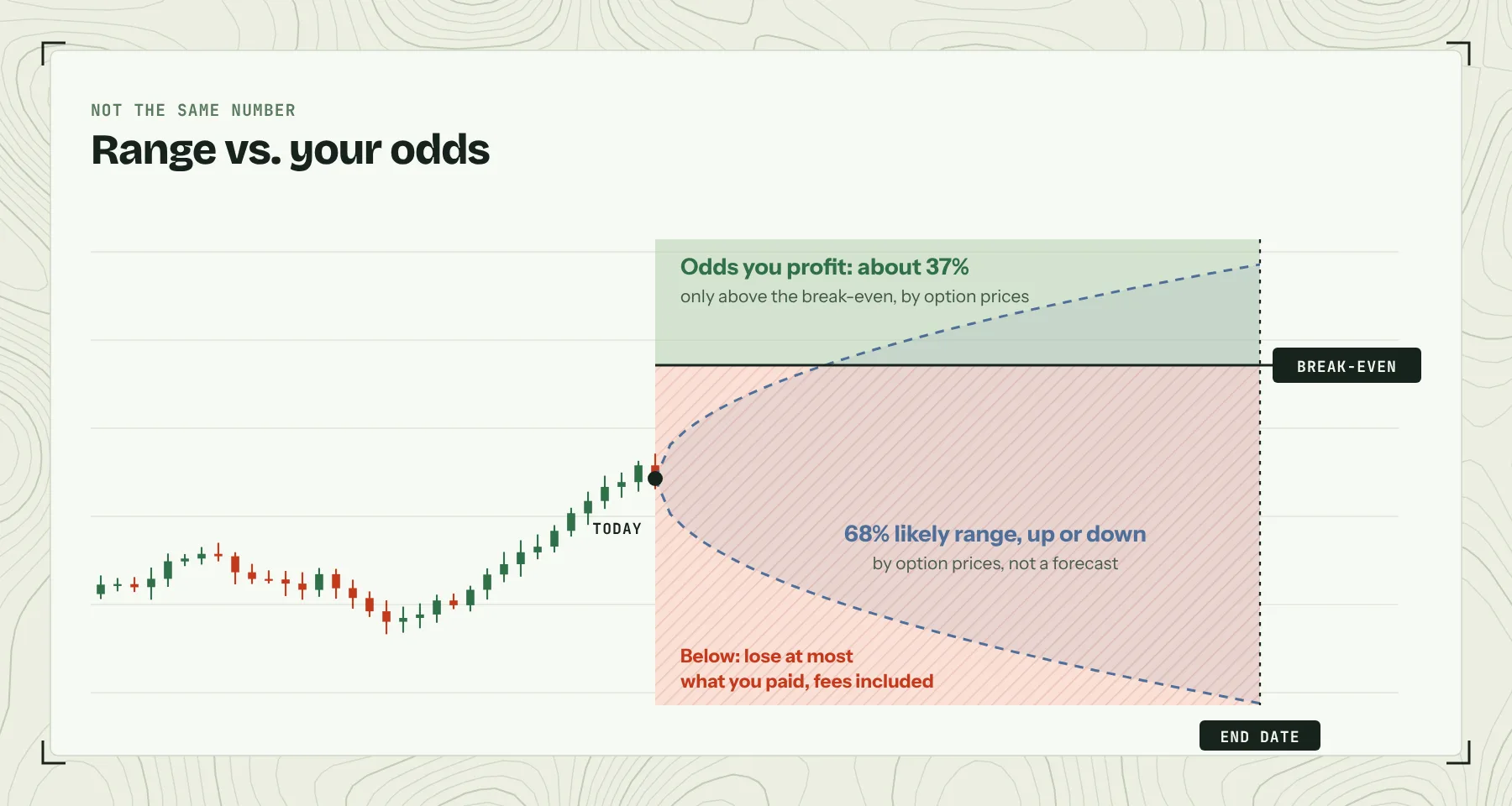
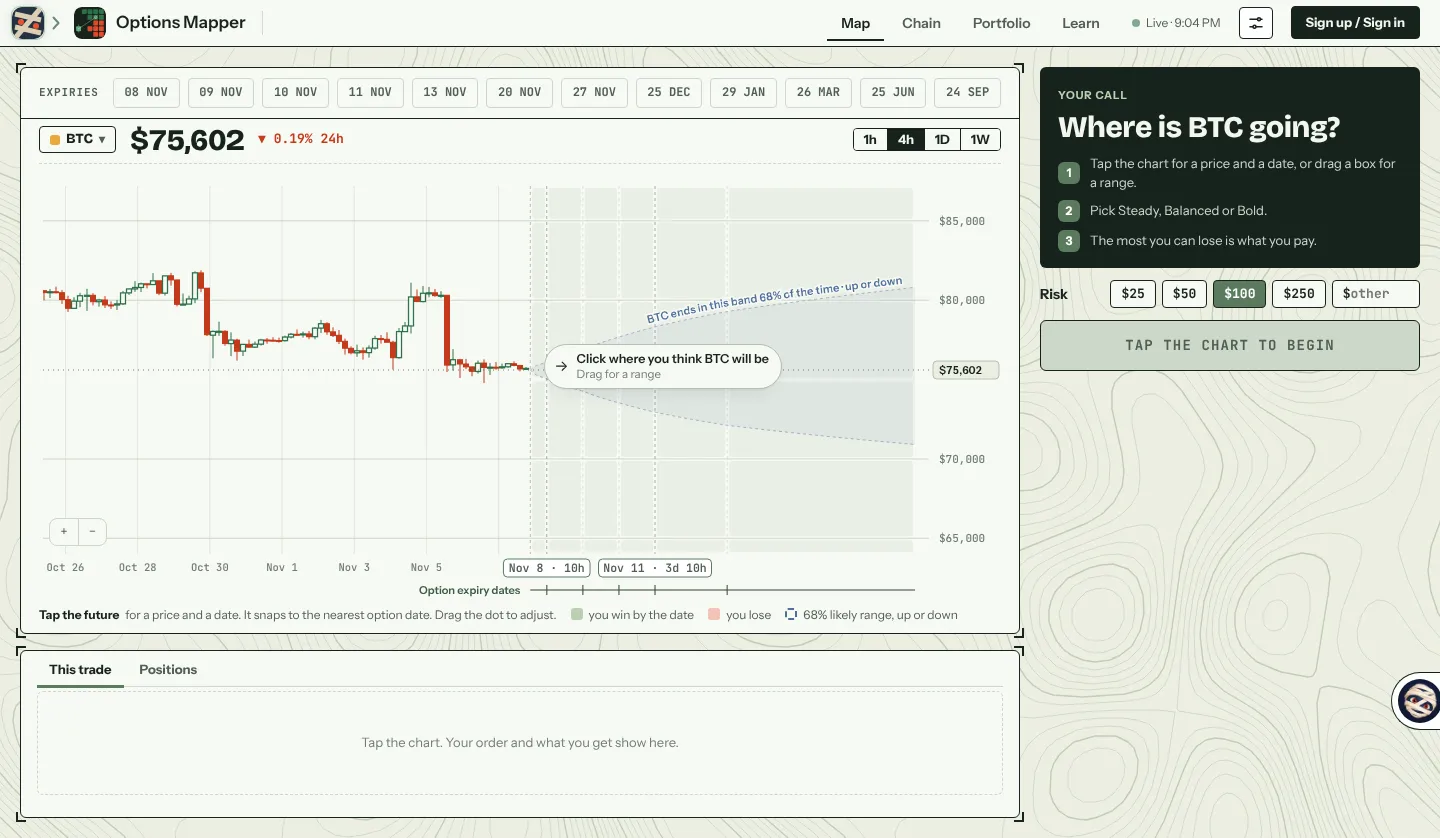
0xM Studio today released Options Mapper, a beta app at 0xm.app/options-mapper. You tap a price and a date on the chart, enter the most you would put on one trade, and Options Mapper lists option trades on Derive, a separate exchange, that fit at current prices. Each one is drawn on the chart as it would settle on its end date: green where it would make money, red where it would lose, never more than what you paid.
An option is a contract you pay for up front that pays out if the price ends past a set level, its strike, on a set date. A call pays when the price ends higher, a put when it ends lower. Most options apps show these as a table of prices, dates and technical measures. Options Mapper starts from the question people already ask about a market, and answers it with a picture and the risk in dollars.
How it works
1Mark your idea
Click a price and a date on the chart, or drag across a price range. The date moves to the nearest day options end on Derive, the exchange where trades are placed.
2Set your risk
Enter the most capital you would put on one trade. Suggestions are sized to it, with Derive’s fees and the 0xM fee included.
3Compare setups
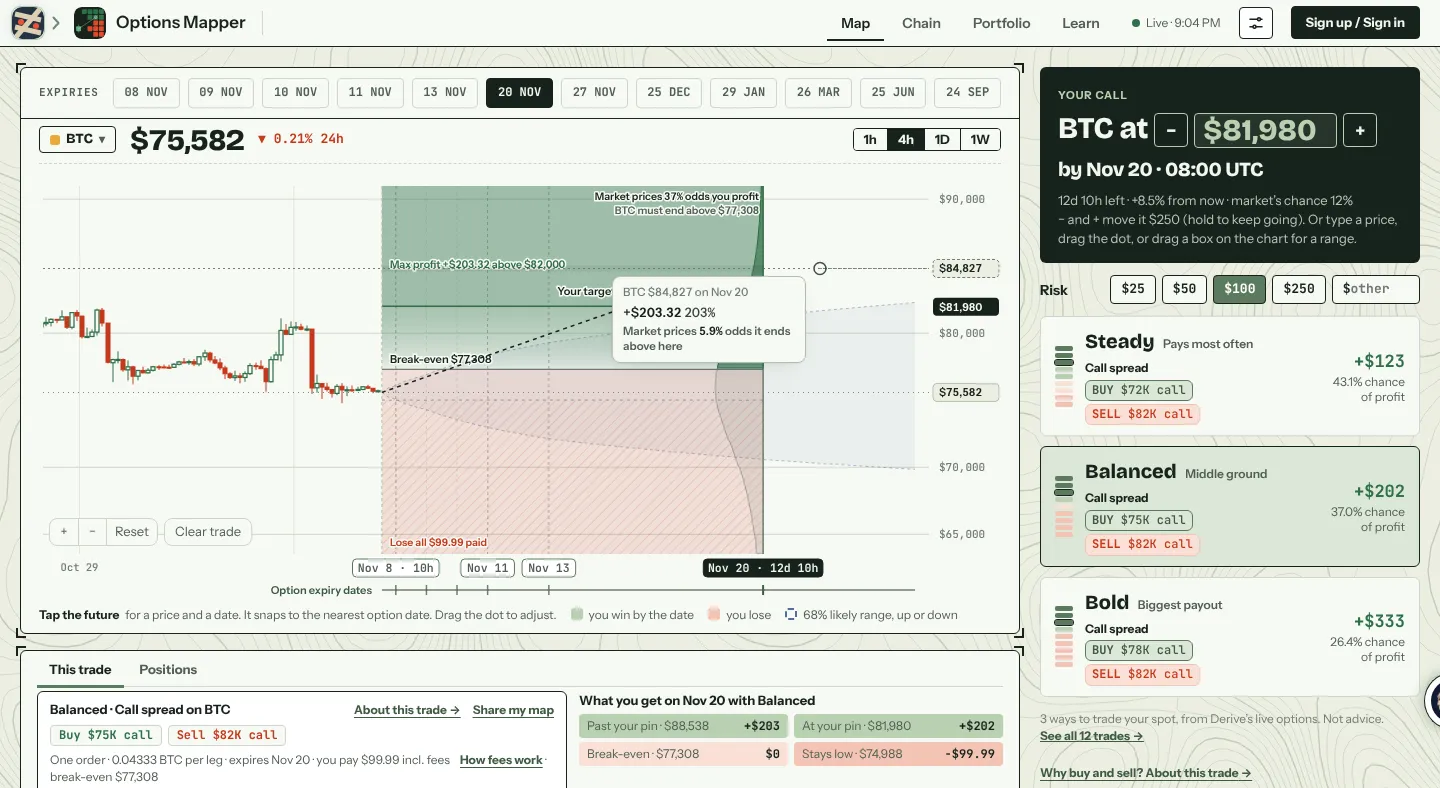
Six kinds of trade, from single calls and puts to spreads, ranges (condors) and straddles. Each is paid for up front, so the most you can lose is what you pay, fees included. Up to three are tagged: Steady pays most often, Bold pays the most when it pays, Balanced sits between. The tags compare setups; they are not a recommendation.
Steady, Balanced and Bold
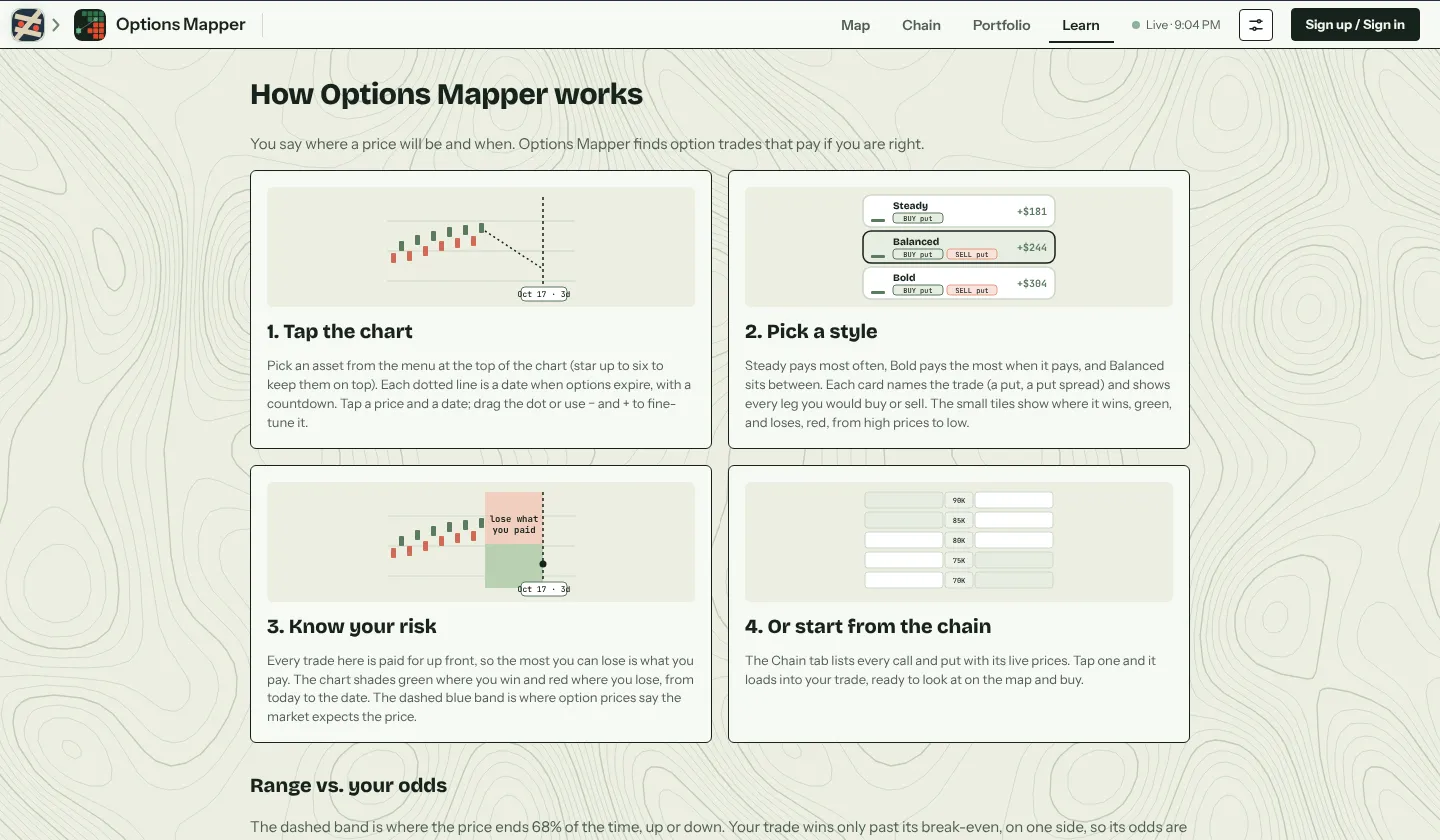
For one target, Options Mapper can suggest up to three trades. All three risk the same amount you set, and each can lose all of it. They differ in how often option prices say the trade pays, and how much it pays when it does.
- Steady has the highest odds of making some profit, and usually the smallest payout.
- Bold has the lowest odds, and usually the biggest payout when the price gets to your target.
- Balanced sits between the two.
Each one is picked only from trades that would make money at your target. The labels compare the setups to each other; they are not a recommendation, and the odds come from option prices, not a forecast.
What the cone shows
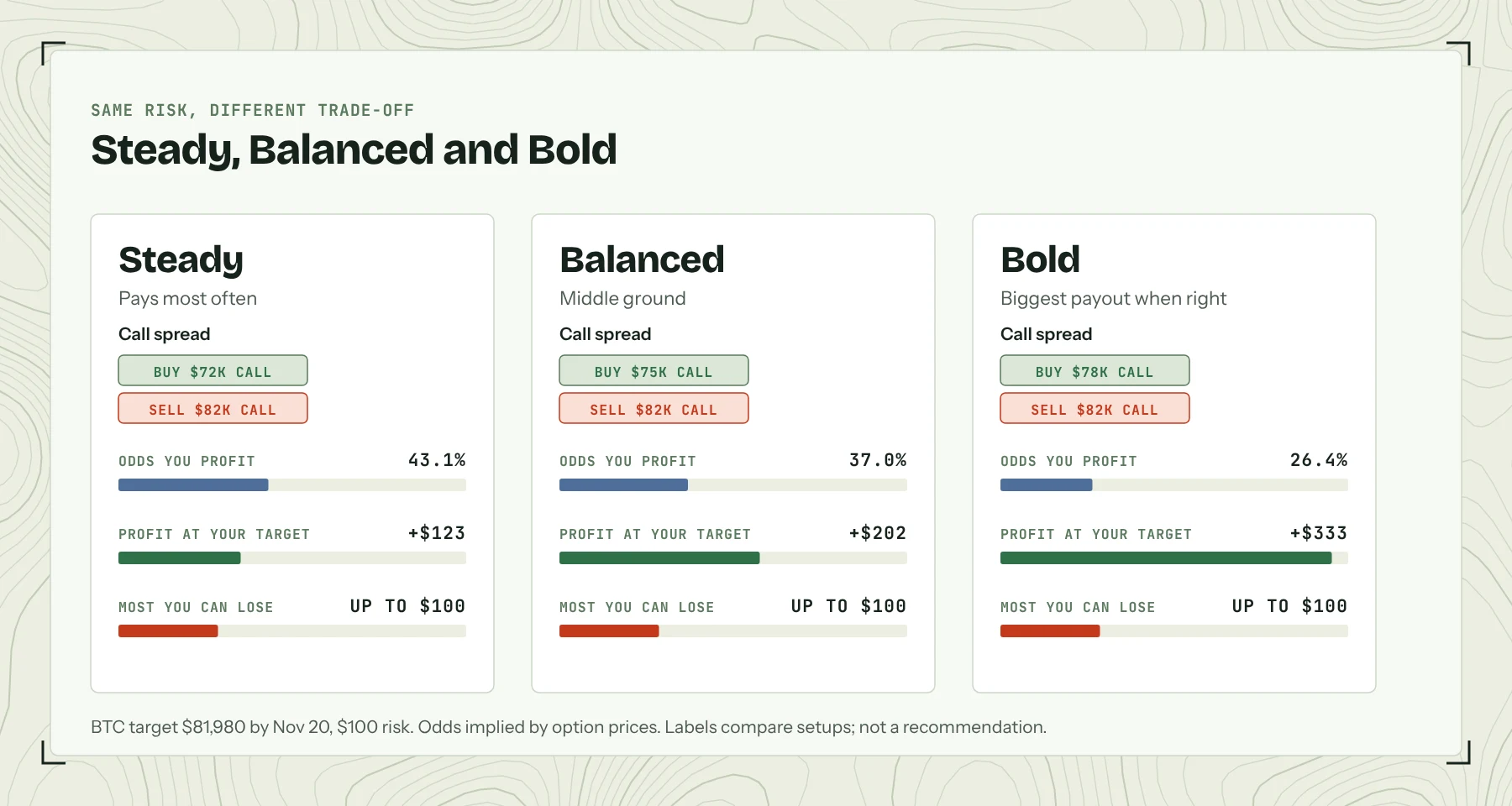
The blue cone on the chart starts at today’s price and widens toward each option date. It is the range where current option prices put the price about 68% of the time, up or down. It is narrow near today because the price has less time to move, and wider farther out. When traders expect bigger swings, options cost more and the cone gets wider.
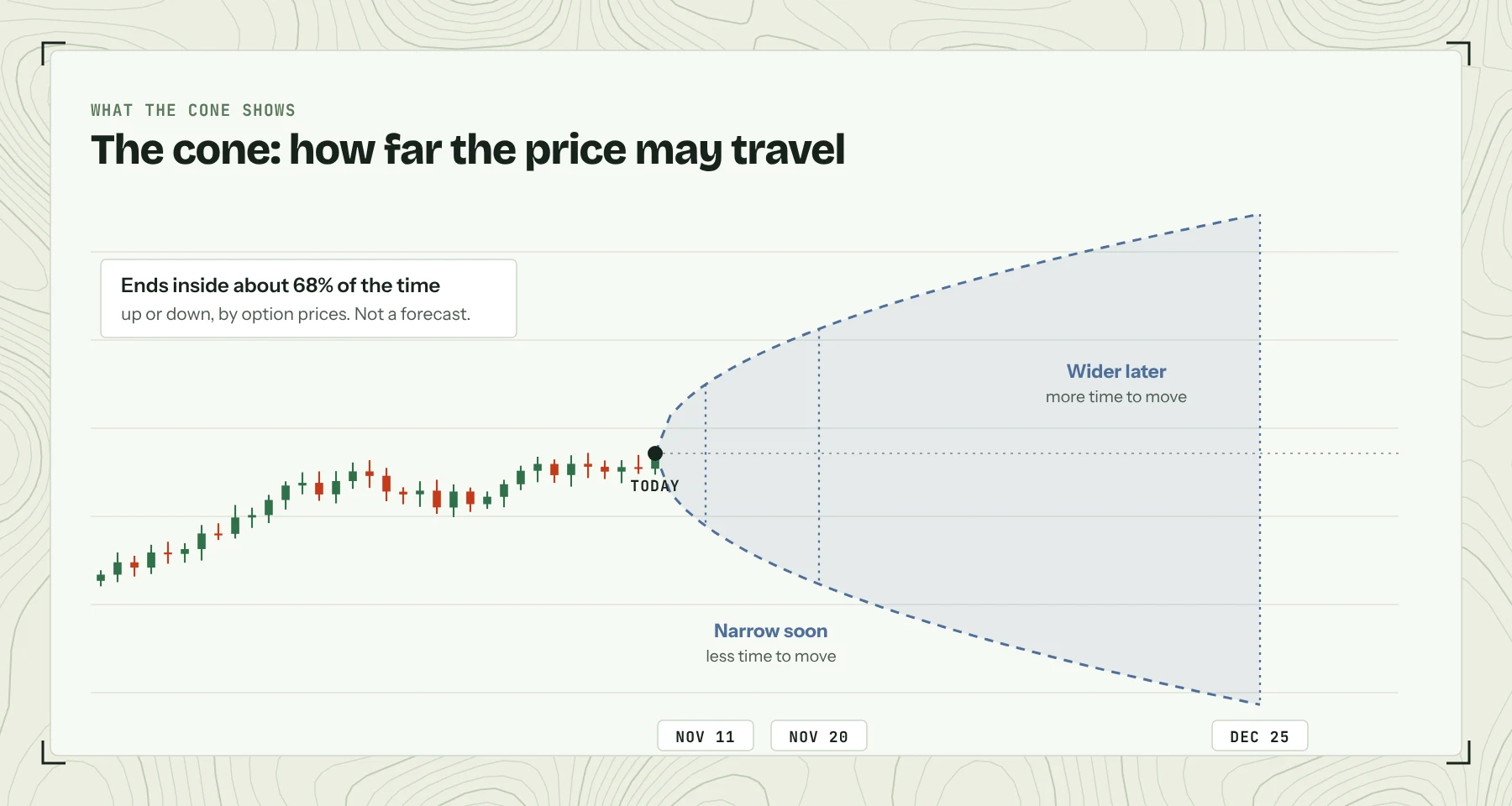
The cone is the market’s range, not a forecast and not your chance of profit. Use it to see whether your target is a small move or a big one for the time you give it.
Risk comes first
- The most you can lose is shown first: what you pay for the trade, fees included. You can lose all of it. Spreads and condors are built so you never owe more than you paid.
- The cone is not your chance of profit. A trade makes money only past its break-even price, which the odds line names.
- Odds are worked out from current option prices. They are not a forecast, and nothing in Options Mapper is advice.
- A trade with more than one option goes to Derive as one request and fills whole or not at all; a single option can fill in part. Prices can move before it fills.
- Before its end date, a position’s value can differ from the picture, which shows the result on that date. Derive options settle automatically in USDC at 08:00 UTC on the end date, on the average price over the 30 minutes before; there is nothing to exercise.
- Paper mode, a switch in Settings, lets anyone practice with paper trades before any money moves. A PAPER tag stays on screen while it is on.
- Options Mapper is beta software. In beta, each real trade is limited to $100 in option prices. You can close a trade you hold early, at Derive’s price at the time, with fees charged again.
“Most people already have a view on where a price is going. Options Mapper lets them draw that view, see what it could cost, and practice before they decide.”
Where you can trade
Real options trading is offered everywhere except the places below, and you remain responsible for the rules where you live. It is not offered in the United States and its territories, Canada, the United Kingdom, Australia, Russia, Cuba, Iran, North Korea, Syria, or the Crimea, Donetsk and Luhansk regions. Options Mapper checks your location on every trade.
From those places, Options Mapper still works for mapping trades, paper mode and the Learn tab, and anyone who holds a position can still close it.
What it costs
Exploring the map and paper trading are free. A real trade carries a 0xM fee of 1% of the option prices of every leg, bought or sold, at least $0.10 and at most $10 a trade, plus Derive’s own fee on each leg. Closing before the end date charges both fees again. There is no 0xM fee when an option reaches its end date, or when you add money to your Derive account.
Learn as you go
Free visual lessons at 0xm.app/learn/options explain what a crypto option is, calls vs. puts, break-even, profit at the end date, and how a put can limit a loss, each with pictures.
Learn inside the app
The Learn tab explains each step with a small picture: tap the chart, pick a style, know your risk, or start from the full list of calls and puts.
Quick answers
- What is Options Mapper?
- An app at 0xm.app/options-mapper, free to explore, that turns a price and a date you tap on a chart into option trades on Derive. Each trade is drawn on the chart with the most you can lose shown first. Real trades carry fees.
- What is an option?
- A contract you pay for up front that pays out if the price ends past a set level on a set date. A call pays when the price ends higher, a put when it ends lower. If it does not, you lose what you paid.
- What is the most I can lose?
- What you pay for the trade, fees included, and you can lose all of it. Every setup is paid for up front, and spreads and condors are built so you never owe more.
- What is the cone on the chart?
- A dashed blue range that starts at today’s price and widens toward each option date. Current option prices put the price inside it about 68% of the time, up or down. It widens with time and when traders expect bigger swings. It is not a forecast.
- Is the cone my chance of profit?
- No. The cone is where current option prices put the price about 68% of the time, up or down. A trade makes money only past its break-even, so its odds are a different number, shown on its own line. Neither is a forecast.
- What do Steady, Balanced and Bold mean?
- Three suggested trades for the same target and the same amount at risk. Steady has the highest odds of making some profit and usually the smallest payout; Bold has the lowest odds and usually the biggest payout at your target; Balanced sits between. Odds come from option prices. The labels compare setups, are not a recommendation, and each can lose all it costs.
- Where can I trade real options with it?
- Everywhere except the United States and its territories, Canada, the United Kingdom, Australia, Russia, Cuba, Iran, North Korea, Syria, and the Crimea, Donetsk and Luhansk regions. You remain responsible for the rules where you live.
- Can I use it in the United States?
- Yes, for mapping trades, paper mode and the Learn tab. Real options trading is not offered there.
- Can I practice without money?
- Yes. Paper mode, a switch in Settings, places paper trades that move no money.
- What does it cost?
- Exploring and paper trading are free. A real trade carries a 0xM fee of 1% of the option prices of every leg, from $0.10 to $10, plus Derive’s fee on each leg. Closing early charges fees again.
- Is it financial advice?
- No. Odds are worked out from option prices, not a forecast, and nothing in Options Mapper is advice.
About 0xM Studio
0xM Studio is an intuitive application studio. Its apps, including Options Mapper, Perp Walk and the Token Command Center, run on 0xM at 0xm.app under one sign-in and one wallet. Real trades are placed, held and settled on the exchanges they use, such as Derive. 0xM Studio has no token; anything carrying the 0xM name on a token list is not ours.
Press: hello@0xm.app · @0xMummy on X